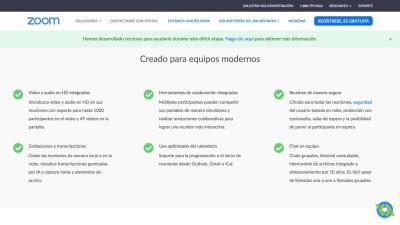
Screenshot
Our Rate
8.9
Resolution (10/10)
Functionality (6/10)
Interface (8/10)
Upgrades (7/10)
Synchronization (2/10)
Review

If many times you are thinking about making video conferences and you have been asked the question of how to do it, I will explain how to use the Zoom application with which you will be able to make video conferences both for interviews or if you have or a company digitally mounted you have to have a meeting with your team because you can thanks to Zoom.

How to video conference or how to use the Zoom app


When you enter the Zoom website the first thing you can see are the plans and prices you have available, there are a number of categories which you have to keep in mind when using it depending on how you want to start working, on the one hand you have the basic plan, Pro, Business and Enterprise.

The first thing you have to do if you want to download Zoom is to go to the official website at the bottom of everything and click on the tab that says Download. Once you have downloaded it and in the upper right you see that it enters, you must put your email from google or Facebook as you can also create an account by filling in the data.

Once you are within the zoom application as on all platforms in the upper right, we have to schedule a meeting, enter a meeting, host a meeting and leave this because it is to deactivate the platform.

In turn, on the left side we have a sidebar that puts my profile, meeting settings, my recordings, my webinars, room management, user management, account management, advanced, zoom for developers, etc. It is important that we become familiar with what is on these tabs in order to understand the tool well.

To start having a meeting there are two ways to do it:

1- You must click on the upper right where it says Enter meeting, because we would enter and a box will appear where you must enter a meeting ID that is a number of 9, 10 or 11 numeric digits.

2- You must click on the side bar on the left of the main page within Zoom where it says My Meetings, once we are inside we are presented with three options: 1- nearby meetings, which can be a scheduled meeting that you have, 2- previous meetings that you can see, 3- personal meeting room.

If we click on a personal meeting room, we will immediately re-display a tab so that you can schedule them with the calendars, and how we would start this meeting is very simple. In the upper right it will tell you to start a meeting, simply clicking there will send you an information pop that will give you the zoom url and wait for a new window to appear in which you can start to start the meetings.

Automatically a window will open that creates a personal meeting, the url of the meeting that you can give to your guests. The maximum amount in a meeting is 100 people with a duration of 40 minutes in the free version. You can add your friends by default email, gmail, yahoo mail or by IM.

When you have a meeting you can chat with the participants, it is also possible to share screen and you can also record.

If you want to share the screen while you are in the meeting, it gives you the option to share your desktop, a whiteboard where you can give information to the people you are currently seeing, iphone or ipad, spotify, etc.

A very good thing that it also has is the record button because all the video conferences that you have can be recorded and then be able to share them with your work team and thus share the information if it has not been able to meet with you at the predetermined time. Once you have finished recording and conference, you should click to end the meeting. It will ask you to confirm if you want to end the meeting for everyone and you must give yes to the end of the meeting.

Zoom is a very powerful tool to be able to give talks, to be able to share information with your team or to join any training videoconference.


Do you want to download this review in pdf for free?

Zoom Cloud Meeting

Get last review 06.02.2026
Pros/Cons
Pros
- Excellent audio quality.

- Interactive

- Friendly platform

- Can be used without a camera
CONS
- Limited number of attendees in the free version

- It fails with a low internet.

- You have flaws like when sharing a video with the group the audio is not heard

- Not all Google contacts appear if you enter with your account details.

Latest NEWS

Virtual backgrounds and filters in your video conference with Zoom Cloud Meeting

Virtual backgrounds and filters in your video conference with Zoom Cloud Meeting

News

Combine crazy Snap Camera filters in your video conferences by Zoom Cloud Meeting. Create your digital office with virtual funds for business meetings. Easily use both options and do not miss any videoconference due to the appearance or not having the perfect environment


Zoom does not guarantee our privacy due to its security flaws

Zoom does not guarantee our privacy due to its security flaws

News

Investigations have exposed the Zoom Cloud Meeting platform due to its low level of security. Hacks and data breaches have been the problems that the program caused to several of the users. The company, which has been severely affected by these failures, is in the process of finding a solution to the security holes


Zoom Cloud Meeting version 5.0 details

Zoom Cloud Meeting version 5.0 details

News

The application that became massive during the pandemic that unleashed the coronavirus presents a new version. Zoom Cloud Meeting seeks to respond to the severe criticism received regarding the security and protection of user data. Among the improvements it adds the possibility of managing passwords and protecting the connections through encryption


Why has Zoom been spared from the boycott in India?

Why has Zoom been spared from the boycott in India?

Headline

As is already known, the Indian government has banned more than 50 Chinese applications alluding to national security. Many are those that have been blacklisted, such as TikTok, however Zoom has been saved. Many people wonder why. The answer is easy, Zoom is not a China-based company, it is a United States company. It is based in California. Yuan, which holds 22% of its shares, has US citizenship so there is no danger to the company. Zoom has become one of the most popular platforms for video conferencing. The global pandemic has placed it at the forefront of this type of application, ahead of Skype. This rapid growth has caused some uncertainty around user privacy, especially after a vulnerability in its use was discovered


Top of the best applications for video conferencing

Top of the best applications for video conferencing

Headline

Until now, the use of tools to make video conferences was not something in use. Remote working groups were used, for those who had to work from home or some conversation between friends sporadically. The pandemic has rethought the way companies work and that has caused them to see in these applications a means to continue their activity. This makes them have to reinvent themselves to be among the most used. Zoom Cloud Meetings, has been the queen of confinement. It offers high quality audio and video and messaging with other platforms. Skype Meetings of up to 25 people can be held, in addition to the possibility of sending text messages, voice calls to phones or sharing photos and videos. Hangouts Meet. It offers high definition with a maximum of 100 participants, it can be easily accessed through a shared link


Connect to Zoom Cloud Meeting from Outlook

Connect to Zoom Cloud Meeting from Outlook

Headline

Working from home translates into more video calls and this means the rise of platforms to make them. Microsoft is one of them, but it recognizes that there are many people who use other services apart from yours, so Outlook for Android in its recent update has added being able to join a meeting in Zoom Cloud Meeting with just a touch


Free
Send us your APP!
Send us your APP for free to our store. Free statistics, review, downloads ...

Contact us

Information Our mission is to give people the ability to show only the best search results and reviews. That's why we offer you a wide variety of best-tasting results, reviews, video games and applications, game news, shopping and much more. Please note that we are not affiliated with any game or application software developer unless otherwise specified. All the games and software applications that you can find in our catalog or in the search results are authentic and have not been modified in any way.
Caxooi.com
Login / Terms / Cookies / Contact / About us

About us | Terms | Contact | caxooi.com Gowa internet mobile SL VAT ID: B87495891. All Rights Reserved. | See information
Can not open /usr/share/GeoIP/GeoIP.dat